How do Polls and Survey Peer Groups work together?
Salary Confidential's data collection is a two-tier structure:
- the poll is the large container for your overall inquiry (for example, "Senior Director of business development");
- the survey peer group is focused on a specific subset of folks within that larger question ("Senior BD at Series B fin-tech", "Senior BD at Fortune 500 fin-tech")
Some polls may only have one survey ; other polls will use the capability of multiple survey peer groups to give you a clear read of how separate peers groups each fare while still allowing you to view all results together at the poll level.
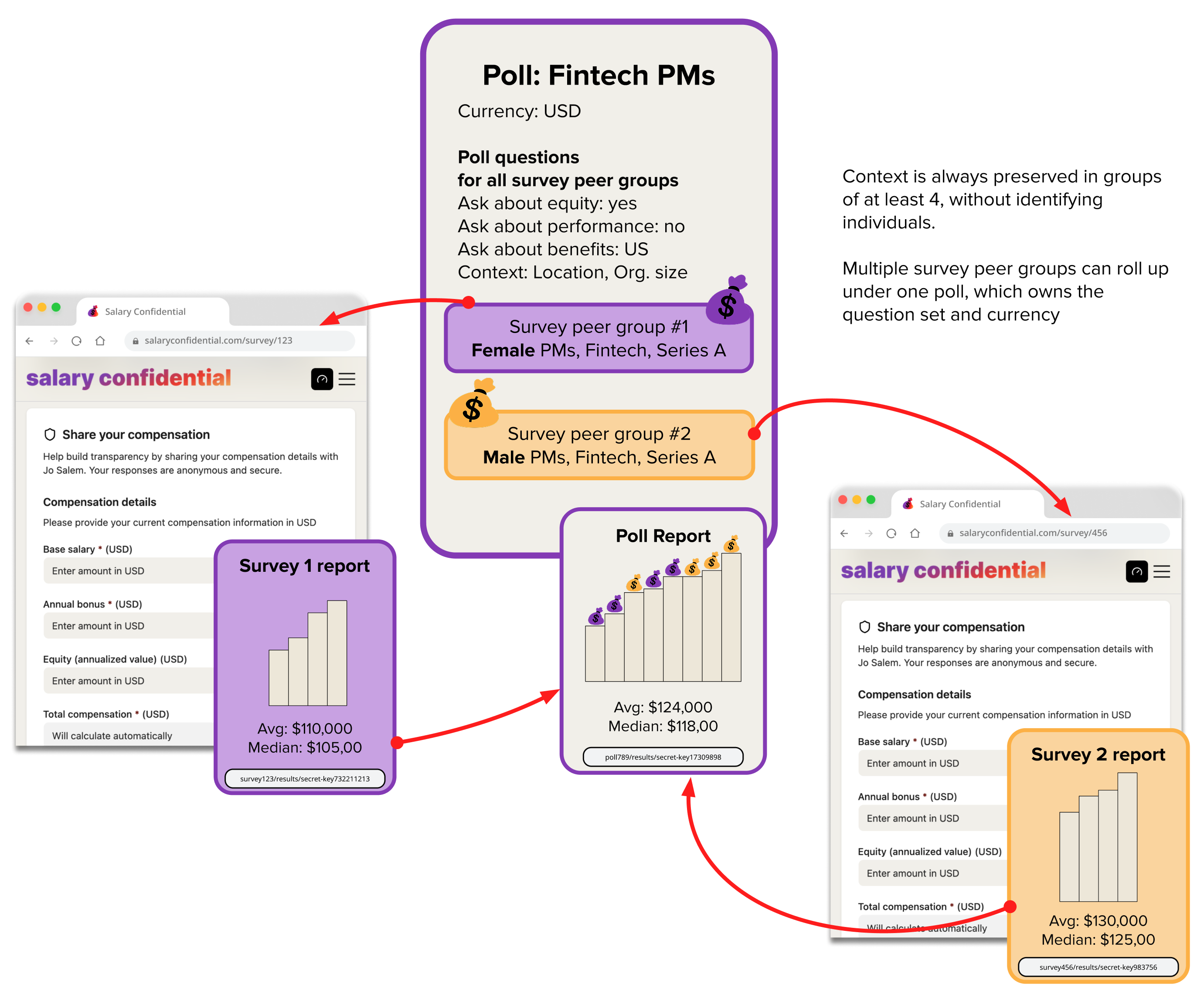
How it works
The poll level is not visible to your respondents. It exists so it can hold the shared data model of all its surveys, and can be there to get a rolled-up views of its surveys if you are running multiple.
For all intents and purposes, the only thing a respondent ever sees is the survey level: Surveys are what get public-facing forms, and they generate their own reports.
Why this two-tier structure exists
This model keeps your data analytically clean. It lets you understand each dataset in its own context. A requester looking to dig into compensation numbers for their own job search will often look at several possible options because most professionals have a few open (if connected) paths ahead of them at any given time. But if you merged your “Senior PMs in Series B SaaS” and “PMs in fintech without MBAs” groups into one survey, you’d collect a wider range of results with little clarity about how each peer group fares. Keeping them in separate Survey peer groups preserves meaning — each dataset answers a narrow, specific question and the survey report calculates its various statistics on just this peer group — while the shared Poll model allows roll-up analysis across the whole search and will calculate all metrics across all results of all survey data collected under it.
In other words, we picked an approach that allowed you to look at your data at close range, and at a wider range. We can only do this if the smallest unit of data gathering is the close range.
The glue between surveys in a poll is the Poll Model
When you first create a poll (and its first survey peer group), you define what questions will be in the Poll "parent" (and this applies to all its Survey children).
If you need to change the underlying data model between two surveys — for instance, one of your surveys is focusing on Senior BD in fintech in New York, and the other survey focuses Senior BD in fintech in London -- you would need to have different fields for each survey (UK pension fields vs American 401Ks; a different currency). For this, you cannot use the same poll parent: you must start a new poll whenever you need a different Poll model.
If surveys were using different models they couldn't be rolled up. There are practical technical reasons for this, but there is also often a statistical angle: in the example of a survey measuring a peer group for the British market getting rolled up with a Survey measuring a peer group in the U.S., and even if we handled currency conversion, we would be doing anyone a disservice proposing averages and means of UK and US salaries -- those wouldn't yield meaningful insight.
You can name your Survey peer groups however you want (names are internal)
To help Requesters keep track of their Surveys, each Survey peer group can be given a title.
This designation is entirely internal to the Requester.
Survey peer group names:
- Do not appear in survey forms
- Do not appear in reports
- Are never visible to Respondents
For example, if a Requester names a Survey peer group "Fintech PMs, Series B, no MBAs", Respondents will never see that label. It’s up to the Requester to decide how (or whether) they describe the peer group when inviting participants.
For this reason, we also assign a generic system name to each Survey peer group (for example, “Survey #2”).
This generic label is what appears in public-facing Poll-level reports that roll up data across multiple peer groups.
For convenience, the Requester sees their custom names in reports -- but we do this by making a separate, authenticated request to our backend. If anyone other than the Requester views the same report link, they get the public version with generic system names (This is very safe, and you can learn more about how we do this in this post, "Can a requester share poll results / Can a respondent share survey results?"